

A new time-saving feature will soon be added to your Rentec Direct software, enabling you to automatically split and categorize tenant payments into individual charges, such as rent, late fees, and utility fees. By automating payment allocation, landlords and property managers can efficiently process tenant payments.
Rentec Direct is excited to share some great news! Your dedicated Rentec Direct Development Team has been working diligently behind the scenes to introduce a new feature that will change the way you process tenant payments. The new Automated Payment Allocation feature is designed to significantly reduce the time spent on tenant payment processing tasks, freeing up time to build tenant and owner relationships or plan ways to grow your business.
The new Automated Payment Allocation feature is all about making your job easier. We understand that managing tenant payments can be time-consuming, and this new feature will simplify that for you. It automatically splits and categorizes tenant payments to individual charges like rent, late fees, and utility chargebacks, eliminating the need to remember balances or perform manual calculations. Simply enter a payment amount, and the software takes care of the rest, making your tenant payment processing tasks a breeze.
What to Expect With the Automated Payment Allocation Feature
Effortless Payment Splits
When you enter a payment, it will automatically split and apply the correct amounts to each invoice or transaction. You can toggle the Auto-Apply feature on or off at any time if you prefer manual entry.

Automatically Assign Categories to Transactions
Say Goodbye to manual categorization! The software will automatically assign the correct income categories to each payment when you indicate which Income Category is associated with payments for specific charges within Products & Services.
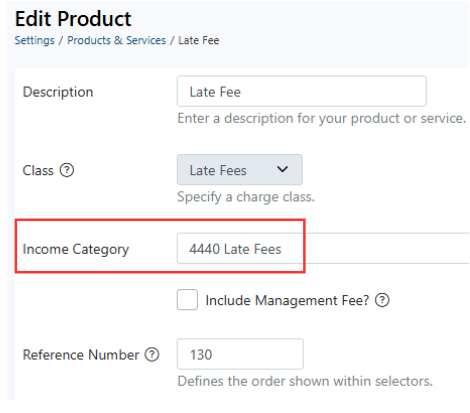
In this example, payments applied to late fee charges would be assigned to Income Category 4440 automatically
Flexible Payment Application
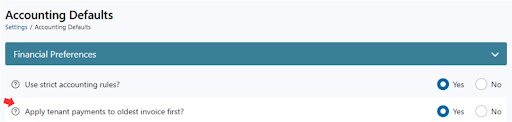
Select whether you want payments to be applied to the oldest or newest invoices first. You can easily change your selection in Accounting Defaults.
Overpayment/Prepayment Management
If a tenant happens to pay more than their rent, the overpayment will be tracked and available for future transactions.
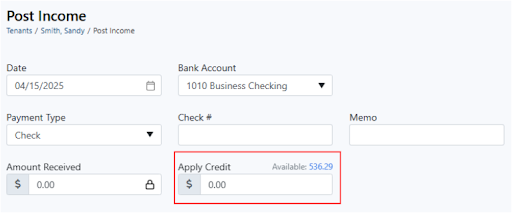
Tip: You can easily view these balances on the newly added Prepaid Liability Report, which can be seen with your other Tenant Reports.
Have Questions?
Your amazing Rentec Direct Success Team is here to help. If you have any questions, connect with your Rentec Direct Success Team at 1-800-881-5139, click on the Live Expert Help Link in your Rentec Direct account to chat or email, or send an email directly to success@rentecdirect.com.
Suggest a Feature
Our goal is always to make your tasks as a landlord or property manager simpler, quicker, and more efficient. One of the ways we accomplish this is by reviewing valuable feedback and input from our awesome clients. If there is anything you would like to see added to enhance your Rentec Direct experience, please send your ideas and suggestions to success@rentecdirect.com and help us shape the future of Rentec Direct.
About Rentec Direct
Rentec Direct delivers industry-leading property management software and tenant screening solutions to real estate professionals. Key features include online rent payments, a mobile app and tenant portal, vacancy listing syndication, and accounting tools. Founded in 2007, Rentec Direct is the third-largest software provider in its sector and is consistently the highest-rated by investors, landlords, and property managers. Recognized on the Inc. 5000 list of fastest-growing private companies for nine consecutive years, Rentec Direct was also named Real Estate Company of the Year in the 2025 American Business Awards and listed among the U.S. Chamber of Commerce’s Top 100 Small Businesses. rentecdirect.com




When will this be available for use?
Hi Yinan, this feature is actively being refined and is expected to go live during the second quarter of this year!
I’m so excited about the upcoming automated payment allocation feature! It’s going to streamline processes and reduce stress for landlords and tenants alike. This innovation not only enhances efficiency but also promotes transparency in transactions—such a vital step forward in property management. Can’t wait to see it in action!