
Rentec Direct’s new Setup Assistant lets you instantly add property details, tenant information, and financial data to your property management software, letting you avoid time-consuming manual entry. The AI-powered data import tools you get with the Rentec Direct Setup Assistant make onboarding quick and painless.
Start using your Rentec Direct property management software right away with new onboarding and data import tools brought to you by the Rentec Direct Setup Assistant. The Setup Assistant from Rentec Direct guides you through adding your properties, tenant information, vendor data, and more. You can chat directly with the Setup Assistant to securely add details to your account or use the AI-powered data import tools.
The new Setup Assistant automatically handles switching from another software or setting up your first property management software account. You’ll be guided through simple questions to set default accounting details before adding property and tenant information.
Data import used to be a time-consuming process, but now you can easily upload a CSV, PDF, or image of your current property information, and the Setup Assistant reads the data and adds it to your account in real time.
The Setup Assistant is perfect for landlords and property managers who are self-starters and want to get their information into their account right away. You still have access to live support and free onboarding with a product advisor at any time; we just wanted to add a tool that helps you get started quickly.
Spend Less Time on Manual Data Entry
Manually entering data can be tedious as you look between two systems or try to edit a CSV or Excel spreadsheet into the right format for a manual data import. That’s why Rentec’s new Setup Assistant can handle multiple formats and pull the information to input directly into your Rentec account for you.
The Setup Assistant works with the information you provide and helps to organize and import it into Rentec Direct. Depending on your account type, you can import the following information:
- Company details
- Properties
- Tenants
- Vendors
- Rent data
- Management settings (late fees, rent
You can upload a spreadsheet, PDF, printed list from your previous software, or even a handwritten list. Once the import is underway, you can continue working in other browser tabs or step away while Rentec Direct processes your information.
How to Get Started With the Setup Assistant
After creating your Rentec Direct account, use the Setup Assistant to begin importing your information.
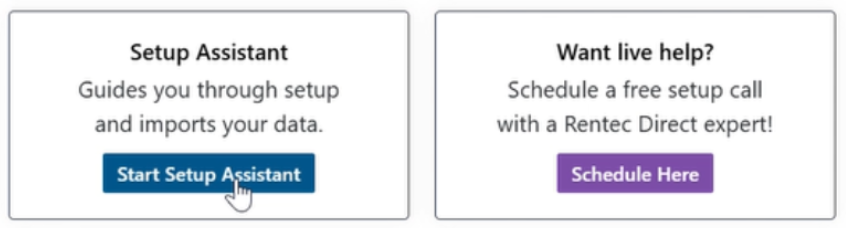
In your Rentec Direct account:
- Click Setup Assistant
- Review your company information and fill in any missing details. You can also complete the missing information later.
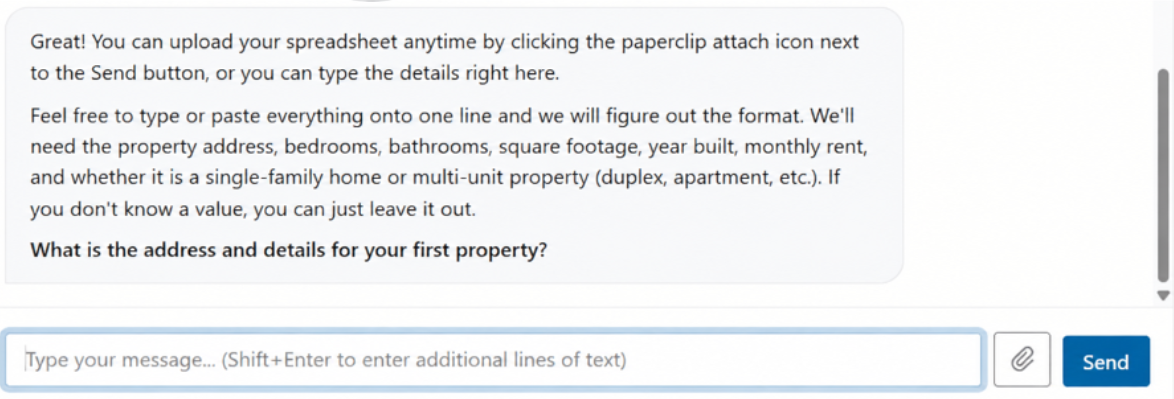
- Click the paperclip icon to upload your property list
- Follow the prompts to enter and import your information
- Review your account and complete any remaining details
Want a Little Extra Help?
You can use the Setup Assistant on your own, work with a Rentec Direct team member, or combine both options.
If you’d like a little extra help getting started, schedule a session with a live Rentec Direct Account Setup Specialist. Our US-based team is here to answer your questions and help you along the way.
How Much Does Setup Cost?
Onboarding is always free for Rentec Direct clients. You can choose to use the Setup Assistant, live onboarding assistance, or a combination of both at no additional cost.
Getting started doesn’t mean you have to get every detail right the first time. The Setup Assistant can help you set up your information in Rentec Direct, and our US-based team is here if you have questions along the way.
Have Questions
Connect with your US-based Award-Winning Success Team weekdays from 6 am to 5 pm (PST). Just click on the Live Expert Help link to email or chat with live support, email success@rentecdirect.com, or call 800-881-5139 ext. 2.
Check out System Updates and News & Tips on your Summary page for the latest Rentec Direct features and industry-related topics, or subscribe to the Rentec Direct Blog to have updates delivered directly to your inbox.
Suggest a Feature
Our goal is always to make your tasks as a landlord, property manager, or investor simpler, quicker, and more efficient. One way we accomplish this is by reviewing valuable feedback and input from our awesome clients. If there’s anything you would like to see added to enhance your Rentec Direct experience, please send your ideas and suggestions to success@rentecdirect.com.
About Rentec Direct
Rentec Direct provides industry-leading property management software and tenant screening solutions for real estate professionals across the small, mid and large property management segments. Key features include online rent payments, a mobile app and tenant portal, vacancy listing syndication, and robust accounting tools. Founded in 2007, Rentec Direct is the largest software platform serving both landlords and property managers, with more five-star reviews than any other property management software. A 10-time honoree on the Inc. 5000 list of fastest-growing private companies, Rentec Direct was also named Real Estate Company of the Year in the 2026 American Business Awards® and recognized among the U.S. Chamber of Commerce’s Top 100 Small Businesses. www.rentecdirect.com