
Rentec Direct is pleased to introduce the launch of significant enhancements to its landlord insurance management tools, designed to help ensure that landlords and investors have current and adequate protection for their investment property and personal interests.
Owning, managing, and investing in rental properties all have their share of pros, cons, potential risks, and rewards. Ensuring that these investments are adequately protected not only protects you and your assets, but is most often a requirement from lenders and as a landlord.
Rentec Direct and Steadily, a leading landlord insurance provider, have partnered since 2021 to offer landlords a seamless integration, providing a convenient way to obtain affordable landlord insurance that protects both properties and owners. Due to this integration and the hard work of your Rentec Direct Development Team, we’ve recently rolled out powerful new enhancements that make obtaining quotes, purchasing insurance, tracking insurance status, and managing your property insurance easier than ever.
What You Can Expect With the New Landlord Insurance Enhancements
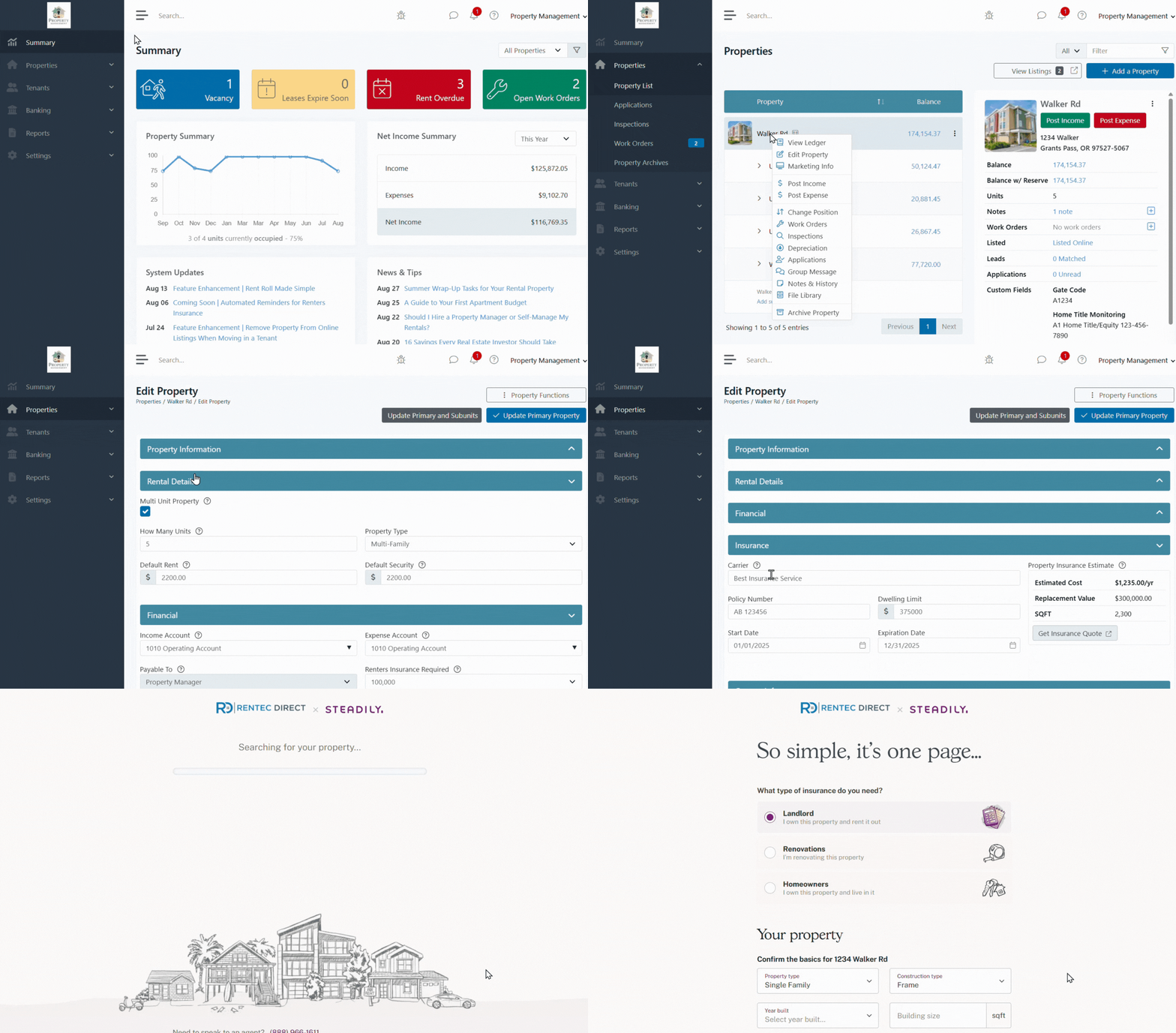
- Dedicated Insurance Information Field: A new section has been added to each property profile to log your insurance details. Previously, we offered a location to enter your policy number, but we’ve expanded it to allow you to save more details, including: Carrier, Policy Number, Limits, and Start and End Dates. If you happen to get your policy via our Steadily integration, Steadily will send us information to automatically update these values for you on every renewal, saving you manual entry and automatically keeping your records up to date.
- Instant Quote Feature: With a valid property address, navigate to the insurance section to view an instant quote that automatically updates when key property details, such as square footage, number of bedrooms, or bathrooms, are changed. Just click “Get Quote” to proceed.
- Automated Information Display: Property insurance information will now automatically appear on all Property Info Cards, providing quick and easy access to critical policy details at a glance.
- Find out more in the Rentec Knowledgebase: Property Info Cards
- New Property Insurance Report: A New Property Insurance Report enables you to effortlessly track the status of all your property insurance policies using various options to customize the report.
- Enhanced Property Filter: A new property filter is now available, enabling you to view a list of properties by Insurance Expired quickly, Insurance Expires Soon, or No Insurance, ensuring you stay ahead of renewals.
- Program Default: Prefer not to see an automatically calculated quote from Steadily on the Property Page? Just turn off the new option in the General Preferences of your Program Defaults.
- Find out more in the Rentec Direct Knowledge Base: Program Default Settings | Preferences
How to Access Your Dedicated Property Insurance Information Field
You can conveniently find the property insurance information field in each stand-alone property and the main unit of multi-unit complexes. The following steps guide you through accessing and updating your data quickly. Hover over the “?” for more helpful information.
In your Rentec Direct account:
- Click on Properties and select Edit Property from the context menu
- Under the NewInsurance field:
- Enter insurance policy information
- View property insurance estimate
- Click on Get Insurance Quote. Follow the prompts to complete a quote with the option to purchase insurance directly through the software.
- Click on Update Property
Printing the New Property Insurance Report
You can now track your property insurance status effortlessly with the New Property Insurance Report.
In your Rentec Direct account:
- Click on Reports
- Under Miscellaneous, select Property Insurance
- Select the Property and Insurance Status to be included (PM clients can also include the property owner)
- Click on Submit
Pro Tips:
* Click on the ⭐to add the report to your favorites
* Schedule the report to be emailed to you monthly or weekly automatically.
Learn more: Feature Spotlight | Automated Scheduled Reports
Final Thoughts
These new enhancements to Rentec Direct software provide landlords and investors with the tools to ensure they have adequate insurance for their assets and themselves, all within a comprehensive insurance management package.
Tip: The automated scheduled reports option of Rentec Direct can create a current Property Insurance report and email it on scheduled intervals to help you stay up on your insurance status.
Check out the System Updates and News & Tips on your Summary page to see the latest Rentec Direct features and industry-related topics, or subscribe to the Rentec Direct Blog and have updates delivered directly to your inbox.
Suggest a Feature
Our goal is always to make your tasks as a landlord, property manager, or investor simpler, quicker, and more efficient. One of the ways we accomplish this is by reviewing valuable feedback and input from our awesome clients. If there’s anything you would like to see added to enhance your Rentec Direct experience, please send your ideas and suggestions to success@rentecdirect.com.
About Rentec Direct
Rentec Direct delivers industry-leading property management software and tenant screening solutions to real estate professionals. Key features include online rent payments, a mobile app and tenant portal, vacancy listing syndication, and accounting tools. Founded in 2007, Rentec Direct is the third-largest software provider in its sector and is consistently the highest-rated by investors, landlords, and property managers. Recognized on the Inc. 5000 list of fastest-growing private companies for nine consecutive years, Rentec Direct was also named Real Estate Company of the Year in the 2025 American Business Awards and listed among the U.S. Chamber of Commerce’s Top 100 Small Businesses. rentecdirect.com