

Rentec Direct now supports numerous passwordless login options, including passkeys, biometrics, Face ID, fingerprints, and other secure login options, to give clients the highest level of security for protecting their data and property management software account.
In order to provide property managers and landlords with additional account security, Rentec Direct has released new passwordless login options for accessing your account and keeping your data safe. A passwordless login is a type of authentication method that verifies a user’s identity without requiring a traditional password. A passwordless login is considered the most secure method of account access.
Here’s how it works:
After setting up a passkey in your Rentec Direct account, the next time a user logs into their account, they can bypass the traditional username and password method and just use their passkey. Passkeys can be physical devices like a USB passkey, biometrics like Face ID or fingerprints, or a digital passkey like those offered through company’s like 1Password.
According to HelpNetSecurity, traditional passwords alone continue to be the weakest link in account security. Passwords are often reused, forgotten, or targeted by phishing attempts, leading to delays and unnecessary lockouts.
That’s why Rentec Direct now supports Passwordless Login using passkeys and biometric security options to give you a modern, phishing-resistant way to sign in without relying on traditional passwords.
How Passwordless Login Works in Rentec Direct
The new passwordless login option (also known as passkey-based authentication) allows you to sign in to your Rentec Direct account without entering a username and password each time. Instead, you would use only an authentication passkey built into your device to verify that it’s really you.
Your login process may vary depending on your device and operating system. For example:
- Mac devices may require Touch ID
- Windows devices may provide the option of a security prompt or PIN-based authentication
- Mobile devices may use Face ID or Fingerprints
- Password managers may require secondary validation to enable the storage of passkeys and passwords.
Common authentication methods used with passwordless login include:
- Touch ID
- Facial recognition
- External security keys
- Device PIN
Using passkeys, your device can verify it’s really you, without sharing or storing a password.
Learn more about Secure Login Options with Rentec Direct
Who Can Use Passwordless Login
This passwordless sign-in option is available to every user on your Rentec Direct account, including:
- Administrators
- Managers
- Users
Each person, with their own login, can enable the passwordless login option without assistance. Enabling a passkey will not change a manager’s or users’ permissions or access level.
This option ensures that every member of your team can benefit from faster, more secure logins while maintaining access to your data within their role-based permissions.
Learn more about Role-Based Permissions with Rentec Direct
What are the Benefits of Passwordless Account Access
- Stronger Security
Passkeys are designed to be phishing-resistant and help reduce exposure to credential-based attacks by relying on device-based authentication instead of shared or reused passwords. - Everyday Convenience
Eliminate the need to remember, type, or reset passwords, helping to prevent lockouts and keeping your work moving. - Save Time
Sign in quickly from your phone, tablet, or computer with fewer steps, fewer interruptions, and less friction.
Why This Matters: Real Security Without Slowing You Down
Traditional passwords alone are one of the weakest links in account security: they are often reused, shared, forgotten, or stolen through phishing attacks.
Passkeys replace passwords with secure, device-based authentication like Face ID, fingerprint recognition, or a secure device PIN. This provides:
- Stronger protection against phishing and credential theft
- Faster logins with fewer interruptions
- Fewer lockouts and resets
Security and convenience work together to provide a smoother login experience while maintaining the security standards you expect.
Additional Login Security Measures
This new sign-in method is Rentec Direct’s newest addition to a layered approach to login security. Additional access protections include:
- Unique logins for each Administrator, Manager, and User
- User-based permissions to control access levels
- Two-factor authentication (2FA) options
- Activity logs that track login and account changes
These login security options help to ensure that only authorized users can access your account with the permissions you’ve assigned.
How to Enable Passkeys

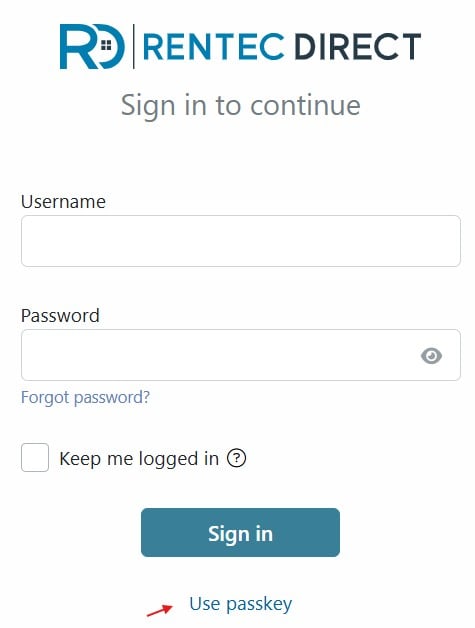
In your Rentec Direct account:
- Click Settings
- Under Account, select Login and Password
- Click Add passkey
- Enter a nickname for the key and click on Add
You will be prompted to select a device to save your passkey or to use a security key, such as a USB hardware key. If you use a password manager, it may prompt you to save the key in its secure storage.
Once enabled, authorized users can select Use Passkey when logging in and enter the authorization prompt. It’s that simple.
Final Thought
Passwordless Login is just one of the many ways Rentec Direct continuously improves account security while simplifying your tasks. No passwords. No friction. Just secure, reliable access to the data you rely on every day.
Have Questions?
Connect with your US-based Award-Winning Success Team weekdays from 6 am to 5 pm (PST). Just click on the Live Expert Help link to email or chat with live support, email success@rentecdirect.com, or call 800-881-5139 ext 2.
Check out the System Updates and News & Tips on your Summary page to see the latest Rentec Direct features and industry-related topics, or subscribe to the Rentec Direct Blog and have updates delivered directly to your inbox.
Suggest a Feature
Our goal is always to make your tasks as a landlord, property manager, or investor simpler, quicker, and more efficient. One way we accomplish this is by reviewing valuable feedback and input from our awesome clients. If there’s anything you would like to see added to enhance your Rentec Direct experience, please send your ideas and suggestions to success@rentecdirect.com.