
Fill vacancies quicker with confidently priced rentals using Rentec Direct’s newly integrated Rentometer Comp Tool. All Rentec Pro and PM accounts now include instant access to real-time market data, and you can set competitive rent rates that reduce vacancy time and support long-term portfolio growth. For a limited time, Rentec Direct is providing access to Rentometer data at no additional cost.
Pricing your rental is one of the most important aspects of property management. Setting rent in line with comparable properties helps attract qualified tenants, reduce vacancy time, and support long-term portfolio growth. Whether you’re marketing a vacant unit, renewing a lease, or onboarding a new property, having reliable market data is essential.
Have you ever gotten caught up, not knowing the right price to charge for a rental, and missed out on filling vacancies because the rate you guessed was too high? Or missed out on income by setting your rent rates too low?
With an ever-changing economy, fluctuating trends in rental amenities, and natural renter cycles, keeping up with the current market rate can seem daunting.
Rentec Direct’s integration with Rentometer removes the guesswork. With just a couple of clicks, you can view an at-a-glance summary or print a detailed report that reflects nearby comparable properties, ensuring your prices stay competitive and your rental stays filled.
Best yet, the quick rental analysis costs you nothing! For a limited time, Rentec Direct is covering the cost of the quick reports so you can instantly see where your property rental rates stand.
What is Rentometer
Rentometer is a widely used rent comparison tool that analyzes a large dataset of U.S. rental listings to provide fast, data-driven pricing insights. It’s commonly used by landlords, property managers, real estate agents, and even investors as a trusted first step for evaluating market rent.

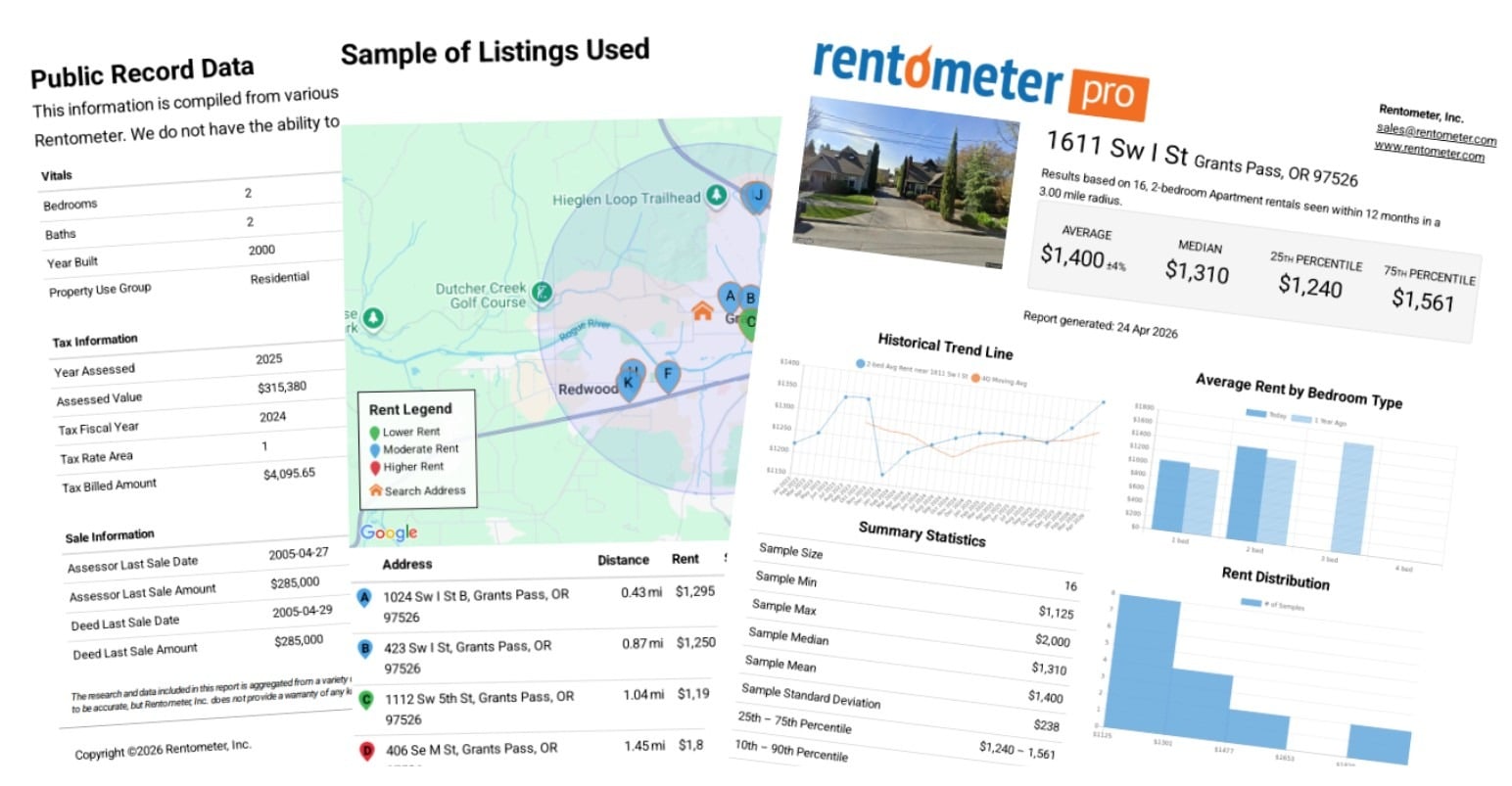
With a simple input of information you’ve already entered into the software, such as property address, bedroom and bathroom count, and property type, Rentec Direct’s integration into Rentometer shows you the average, median, 25th, and 75th percentile rents for comps in the area.
Need more information? No problem – You can also order a Rentometer Pro report right in the software. The Rentometer Pro report costs $1.00 and gives you a PDF report that you can even share with your owner, which includes:
- Average and median rent prices
- Nearby comparable rentals (“comps”)
- Historic rental trends over time
- A comparison of your rent against similar properties
- More information about the sample sizes used to determine the values
- A map and addresses of “comps” used to generate the values
- Additional property information
Rentometer has a proven track record of over 15 years, delivering tens of millions of comps to hundreds of thousands of users. Rentometer continues to expand its database with millions of new rental records each year to deliver reliable market intelligence.
Learn more about Rentometer
Key Benefits of the Integration
This built-in integration provides you with the tools to strengthen your pricing strategy with real-world rental data without adding extra steps to your workflow.
Reduce vacancy time
Quickly confirm whether your pricing aligns with market expectations to help fill units faster.
Faster, easier comp analysis
Access nearby comparable rentals in a single report without manual research, using property details like square footage, year built, and bed/bath count that are already in your account. This can save you and your staff up to an hour of research per unit.
Smarter investment decisions
Estimate potential rent and cash flow when evaluating new properties, making deal analysis faster and more reliable.
Greater transparency and confidence
Back your pricing with data you can confidently share with owners, tenants, and stakeholders
Built-in convenience
Unlike standalone tools (such as rent calculators on listing sites), Rentometer is fully integrated with Rentec Direct, so you don’t have to leave your workflow to gather comps.
Common use cases include:
- Setting competitive rent prices
- Evaluating rental investment opportunities
- Comparing market trends across locations and property types
- Reviewing lease and property management agreement renewals
How It Works
Rentometer links are conveniently located in the Edit Property, Edit Tenant, and Update Lease sections of your Rentec Direct account. Making it easy to use when evaluating a property’s current rent, marketing, and updating a tenant’s lease.
Once activated, Rentometer uses your existing property data to generate an instant comparison report of similar nearby rentals, based on publicly available data.
Within seconds, you’ll see:
- An at-a-glance rent comparison (average, median, and percentiles)
- A link to order a detailed, printable report
Reports created are based on property details such as:
- Address
- Year Built
- Number of Bedrooms / Bathrooms
- Property Type
From the at-a-glance view, you can select a suggested rent and automatically apply it as your default rate, reducing manual entry and saving time.
Click the Show Rentometer Pro Report link to view an extended printable report that includes more details, such as:
- Historical Trend Line
- Average Rent by Number of Bedrooms
- Rent cost per square foot
- A list of properties and comparative data used to create the report
The Rentometer Pro report is an excellent resource to show your property owners when pricing their units.
Rentometer Pro reports cost $1.00 each and will be included on your regular monthly invoice. There is no requirement to sign up for a Rentometer account or pay Rentometer a monthly fee.
Getting Started
Use the following steps to get started using Rentometer today.
In your Rentec Direct account:
- Click on Settings
- Under Program, select Program Defaults
- Scroll to the bottom under Integrations, and set Enable Rentometer Integration to Yes
- Save Changes
Once activated, the New Rentometer Feature will be available in your Edit Property, Edit Tenant, and Update Lease screens. The following steps walk through accessing the feature in your Edit Property screen.

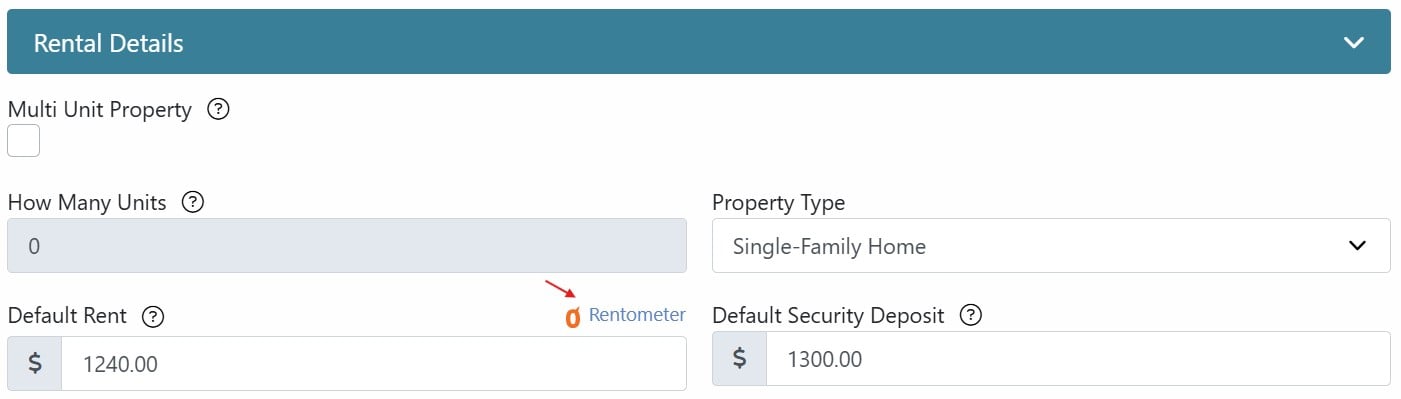
In your Rentec Direct account:
- Click on Properties
- Right-click on a property and select Edit Property
- Click on the Rentometer link next to Default Rent
Go to the knowledge base to learn more about Getting Started with Rentometer Rent Comps
Is it OK to use public rental listing data to help price your units?
If you follow property management news, you likely heard about the Department of Justice (DOJ) antitrust lawsuit and subsequent settlement regarding rental pricing software. The DOJ targeted the use of non-public, real-time data shared between competing landlords to artificially coordinate rent increases. Essentially, proprietary information hidden from the public was being used to align pricing across large numbers of units, which is neither legal nor fair to the general public. Under the DOJ’s settlement, software providers are now prohibited from using this kind of non-public competitor data to generate live pricing recommendations.
How is Rentometer different? Rentometer relies entirely on publicly available information to calculate average, median, and percentile pricing for an area.
Think of it this way: if you were to open up your local listing sites (like Zillow or Apartments.com), look at every active rental in your neighborhood, and manually calculate the average rent on a spreadsheet, you would be doing the exact same thing Rentometer does. Rentometer simply automates that process, saving you hours of manual research by compiling public market data in just a few seconds. Using public market data to assist in pricing your rentals remains entirely legal, ethical, and standard practice.
This is not legal advice. Rentec Direct does not provide legal advice, and we recommend you consult your own attorney when making legal decisions. However, our analysis indicates that using Rentometer is a widely accepted norm, and appears to be both ethical and legal.
| New York & California Users New York and California recently enacted sweeping laws restricting the use of multi-property data algorithms to recommend or influence rental rates. While these laws target collusive corporate software, their broad language could possibly sweep in public data, and other states could implement similar laws in the future. If you, or your legal counsel, are uncomfortable using public data to help research rental rates in your area, you can easily disable the Rentometer integration at any time in Settings > Program Defaults. Compliance Tip: Rentometer provides raw, public market averages for transparency. To remain fully compliant with NY and CA regulations, ensure that Rentometer is used strictly as a research tool and that all final rental prices reflect your own independent business judgment. |
Final Thoughts
Rentometer is just one of the many integrated features in Rentec Direct, designed to work for you by streamlining daily operations, reducing repetitive data entry, and providing the tools you need to help manage and grow your portfolio.
Learn more about Rentec Direct’s integrated features
Have Questions?
Connect with your US-based Award-Winning Success Team weekdays from 6 am to 5 pm (PST). Just click on the Live Expert Help link to email or chat with live support, email success@rentecdirect.com, or call 800-881-5139 ext 2.
Check out the System Updates and News & Tips on your Summary page to see the latest Rentec Direct features and industry-related topics, or subscribe to the Rentec Direct Blog and have updates delivered directly to your inbox.
Suggest a Feature
Our goal is always to make your tasks as a landlord, property manager, or investor simpler, quicker, and more efficient. One way we accomplish this is by reviewing valuable feedback and input from our awesome clients. If there’s anything you would like to see added to enhance your Rentec Direct experience, please send your ideas and suggestions to success@rentecdirect.com.
About Rentec Direct
Rentec Direct provides industry-leading property management software and tenant screening solutions for real estate professionals across the small, mid and large property management segments. Key features include online rent payments, a mobile app and tenant portal, vacancy listing syndication, and robust accounting tools. Founded in 2007, Rentec Direct is the largest software platform serving both landlords and property managers, with more five-star reviews than any other property management software. A nine-time honoree on the Inc. 5000 list of fastest-growing private companies, Rentec Direct was also named Real Estate Company of the Year in the 2026 American Business Awards® and recognized among the U.S. Chamber of Commerce’s Top 100 Small Businesses. rentecdirect.com