
We’ve had a number of requests to add a feature which allows for quick addition of a note to a tenant or property, which is then apparent when viewing the tenant or property list. We’ve done just that using the traditional sticky notepad concept.
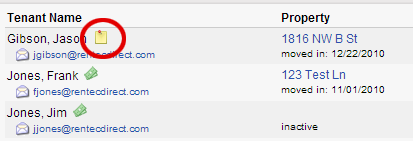
To use this new feature, just right-click on a tenant or property, choose Notes & History, then click the button to Add Sticky Note. Once a sticky note has been added, the icon seen in the screenshot below will show up next to your item. Clicking the icon brings up the sticky. To remove the sticky note, simply delete the contents.





How do you delete a Sticky Note? Deleting the contents leaves the Sticky Note on the property display. Please advise.
How did you delete the sticky note?
To remove the sticky note, simply delete the contents. Then hit shift-refresh on the Property List display.
@Larry Rodda Never mind. I tried it a second time and it seemed to work. I think I had to refresh the Property List display in between.
Awesome feature! Easy to use too.